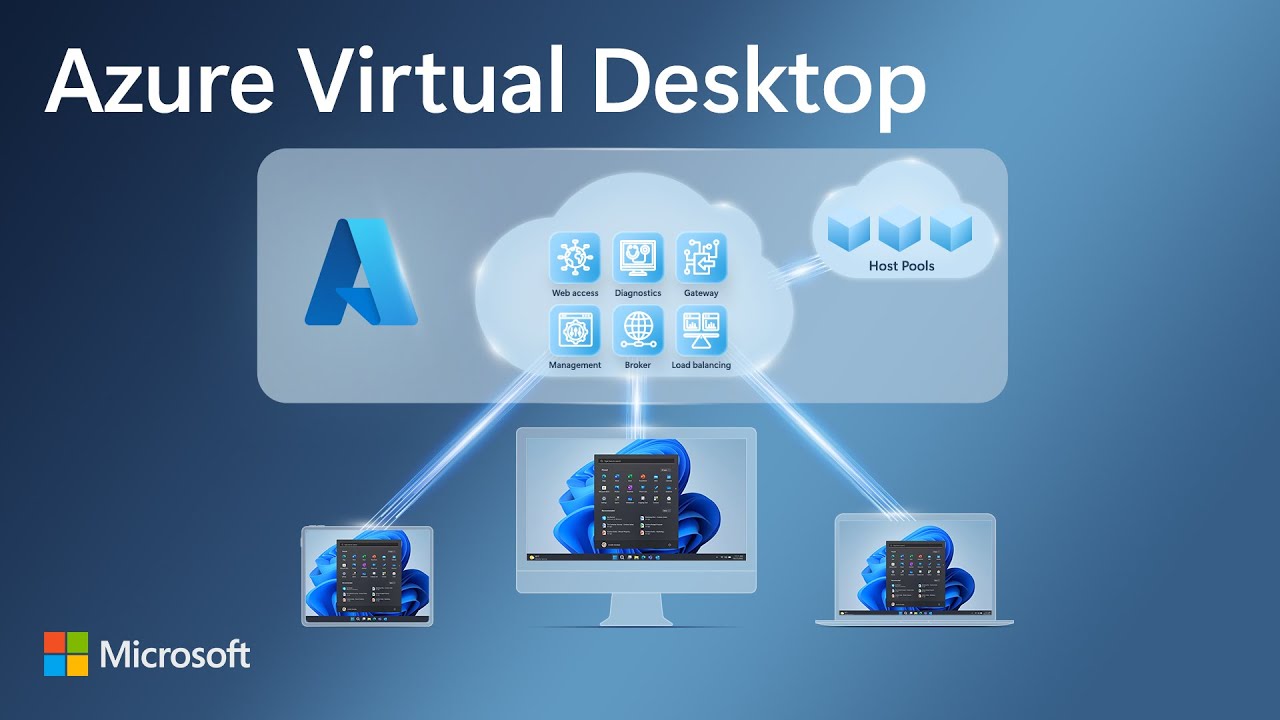
What is Azure Virtual Desktop? - Azure - Azure Virtual Desktop | Microsoft  Learn

Following a detailed review, we recommended a migration to Azure Virtual Desktop (AVD), Microsoft’s modern platform for secure, virtualised workspaces. This approach eliminated the need for a hefty hardware and licensing investment while improving performance, flexibility, resilience and security.

The migration was completed with minimal downtime, and staff immediately noticed smoother performance and faster logins via the Windows App. The thin-client setup remained intact but users could now securely access their full desktop environment from any location, at home, in the office or on the go from any device.

This change came with significant gains from previous iterations of their on-premises hardware. From managing an non-synchronised Domain, a risky setup from the start of just one session host for the entire organisation and the risk of failure on the equipment being. The equipment was only replaced every 5 years so to have been able to setup AVD for them has been tremendously rewarding. Some of the key benefits achieved through the RDS-to-AVD transition included:

  • 66% Cost Saving Over Five Years: Reduced capital expenditure, no hardware refresh and consumption-based pricing on Azure, paying for only what they needed.
  • Improved Business Continuity and Disaster Recovery (BCP/DR): Azure’s built-in replication and resilience ensure that operations can continue even if local infrastructure fails.
  • Enhanced Mobility and Remote Work: Staff now have the option to log in securely from any device, improving flexibility and enabling true remote collaboration.
  • Simplified IT Management: Updates, scalability, and monitoring are centrally managed through the Azure portal, reducing the strain on internal IT resources.
  • Better Security and Compliance: Azure’s enterprise-grade security, including MFA, conditional access and endpoint control provides stronger protection for sensitive data.
  • Optimised Performance: Cloud-hosted desktops automatically adjust resources based on user demand, ensuring consistent application performance.
  • Future-Ready Foundation:The company can scale confidently as the business grows, without costly hardware replacements or licensing complexity.

Together, these outcomes not only delivered direct cost savings but also positioned the business, got more out of their existing licenses, saved on their power bill and most importantly, staff no longer depended on physical office, ensuring peace of mind and operational readiness under any circumstance.